Choose Swiss for the right job
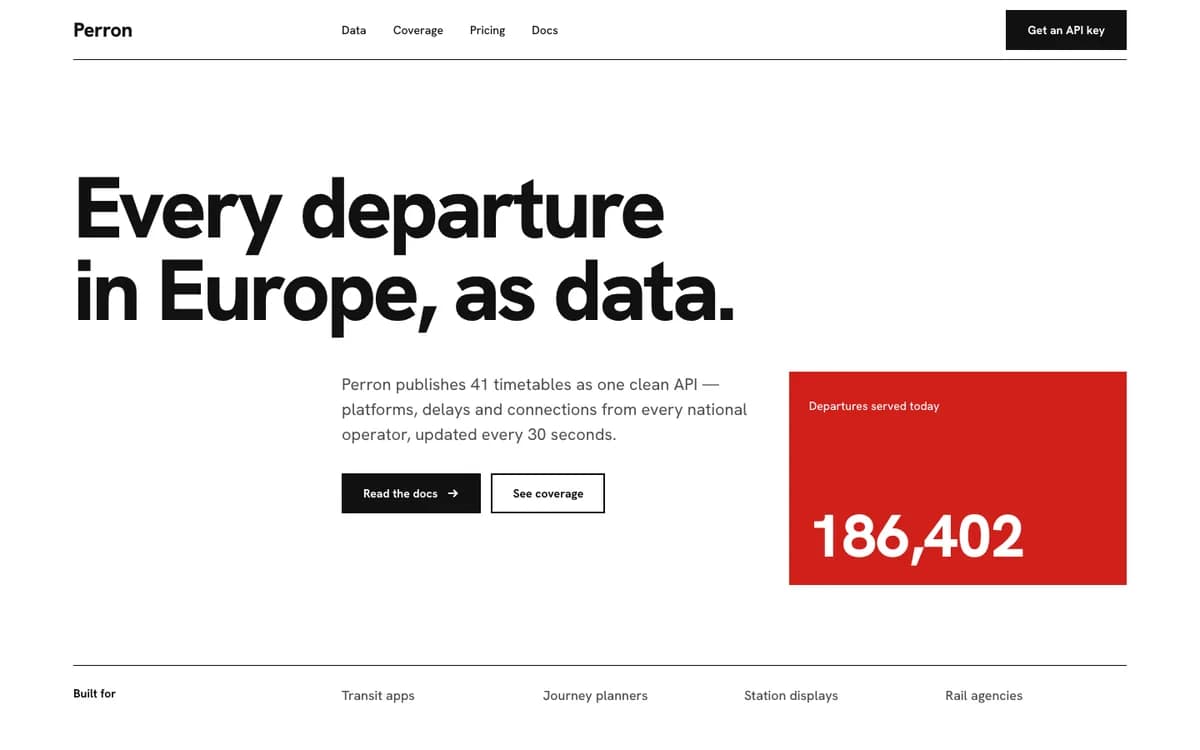
Swiss suits studios, developer products and data-heavy marketing where hierarchy matters more than decoration. It uses Hanken Grotesk, a twelve-column grid, neutral fields and a single red field for emphasis. It does not rely on rounded floating cards, shadows or centered headlines.
It is a poor fit for a warm, soft consumer brand. Preview a different taste before you install if that is the direction your product needs. The reference below is the Perron exemplar shipped with the package, not a claim that every model will generate the identical page.
Install the free skill
Open the Swiss product page and create a free Taste Stack account. The download is free; an account supplies the private install link. Your coding agent and any model usage are separate from Taste Stack.
Choose Claude Code under Install, then copy the generated install prompt into your agent. It downloads the package into the skills folder and asks the agent to read SKILL.md. Use the generated link rather than a command copied from someone else: personal links expire after seven days.
- Start in a new project so an existing design system does not compete with the skill.
- Install one taste for this first run. Ask the agent to confirm which SKILL.md it read and summarize its typography, grid and color rules.
- If the skill is not visible, follow the current agent-specific instructions in the setup guide before generating the site.
Give the agent a product brief
Describe the product, content and required interactions. Let Swiss supply the visual decisions. This short brief is a suggested exercise; it is not the recorded Ledgerline validation run shown on the Editorial product page.
Use the installed taste-swiss skill. Build a landing page and a dashboard for a small invoicing product for freelancers. The landing needs a clear offer, three capabilities, pricing and a closing action. The dashboard needs revenue, overdue invoices, a monthly chart and an invoice table. Use one shared stylesheet and the same navigation, button, type and spacing rules on both pages. Keep it usable on a phone. State which skill files you read and any requirement you could not meet.A recorded Swiss task in Codex
Owner-run exercise · 14 November 2026. Client names, prices and revenue are sample data.
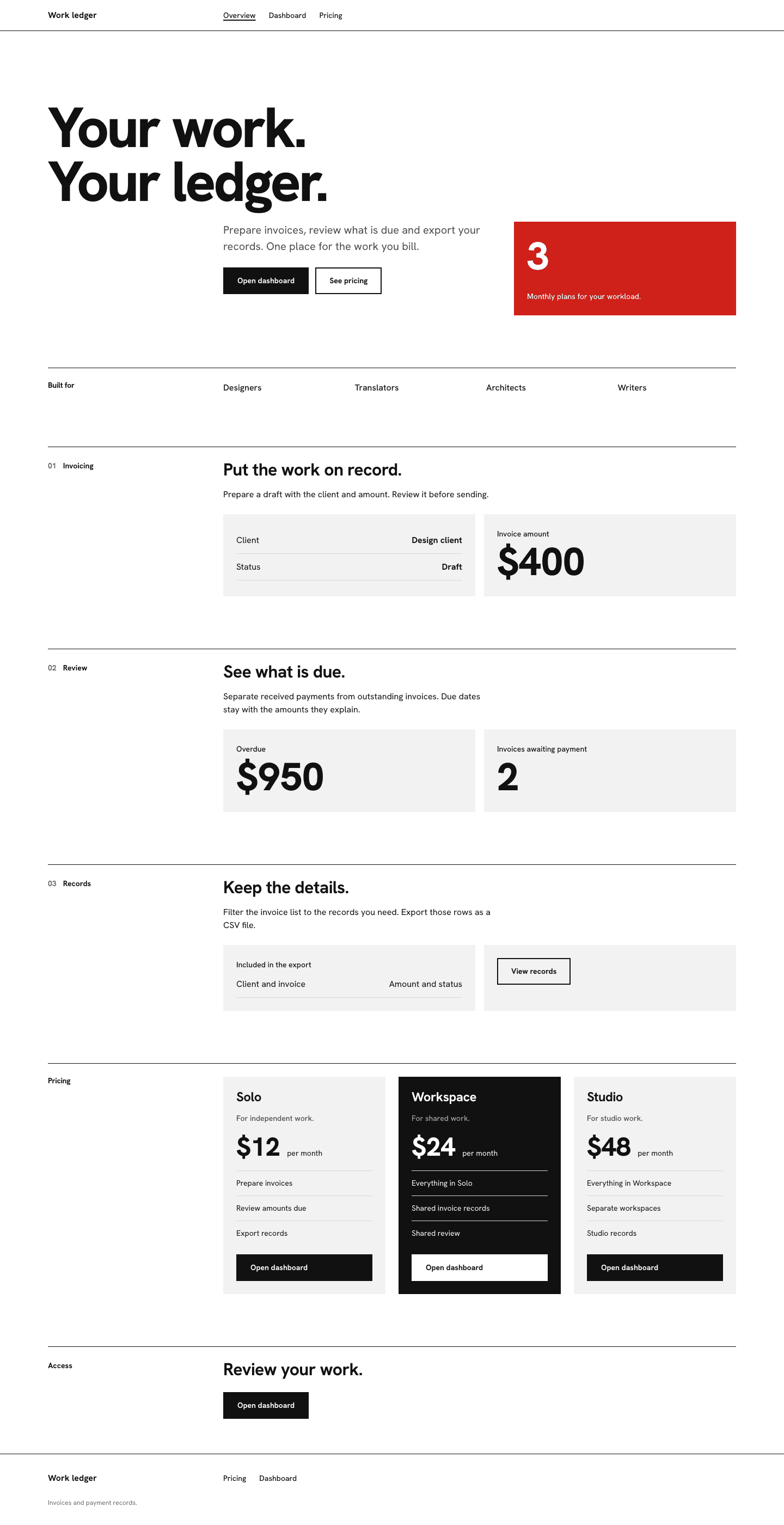
Codex was asked to use Swiss and explicitly read the installed skill and its supporting rules. It used the starter task above to build an invoicing landing page and dashboard with shared styles. Skill discovery was confirmed separately; automatic selection in a fresh session was not tested. Open the full captures below to inspect the output.
Both pages were checked at 375, 768, 1024, 1100 and 1440 pixels, with no horizontal overflow. Font loading, phone controls, keyboard focus, overdue filtering, draft creation and CSV export were also checked.
This is a first-party exercise without a baseline comparison. The result is a browser-only prototype: invoice actions reset on reload, with no account, payment or storage backend.

Check the result before you ship
Compare both pages with the package reference and its non-negotiables. Check alignment, type hierarchy and whether red still has a specific job. A page can look different from the exemplar and still follow the identity; the layout must adapt to your actual content.
- At desktop width, follow one column line through navigation, headline, figures and footer. Elements that nearly align should align.
- At phone width, check the longest headline, pricing labels and table values. A screenshot of only the hero does not verify the rest of the page.
- Test keyboard focus, form labels, contrast and reduced motion. A design skill does not replace accessibility or functionality testing.
- Ask for a new section using the existing tokens and components. If a second font or unrelated card style appears, repair that drift before adding more pages.
When to choose a different taste
Swiss communicates order through alignment and one type family. Editorial uses characterful serif headlines, warm paper and hairline rules. The same business can use either, but the visual message differs. Compare the examples, then choose one identity for the project.
Installing a skill does not guarantee a specific screenshot or eliminate review. Model, content, existing CSS and competing instructions can all change the result. Keep the skill version and your brief with the project so you can reproduce and investigate changes.
Continue with a real project
Open Swiss to inspect the current package, price, license and supported agents. For another direction, compare Swiss and Editorial.
Related field guides
Sources and scope
This is Taste Stack’s own product guidance. The package files and published product examples are the source for its visual rules. The suggested prompts are exercises, not additional completed benchmarks.